Showing posts with label development. Show all posts

2009-10-20

First Google Wave Gadget: 5x5

Last week I was lucky enough to get an invite to Google Wave (having signed up for an invite back in May when I first saw the Google I/O presentation video). Like most people, I imagine, I spent a couple of days getting to know it, finding contacts I know, waiting for the people I invited to turn up, and also playing around with some of the robots and gadgets that are currently available. By the weekend I was itching to do something about gadget development so I had a quick read of the development tutorial and started to play.

The first couple of gadgets were simply throw-away tests but I finally decided on something a little more "meaty" to try (still rather simple, but something more than just pure "Hello, World!" type testing). I decided to to a Wave-enabled version of my 5x5 puzzle.

The very first version was up and running in no time, but it wasn't terribly use as it didn't save and share state. Not to long later, however, I'd got my head around Wave's shared state system and I had a Wave Gadget version of 5x5 that multiple people could view and interact with.

Here's how it looks inside a Wave:
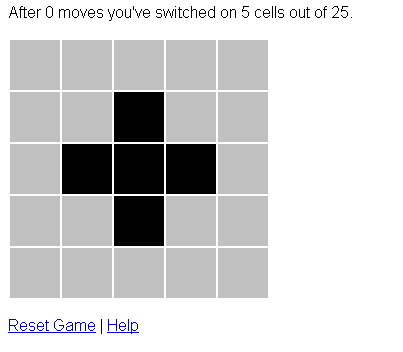


Nothing too clever, but one step along learning how to code for Wave.

If you're on Wave, and you fancy having a play, just use the add-gadget button and paste this URL into the dialog that pops up:

http://serenity.davep.org/5x5/5x5.xml

There's also a version hosted over on GitHub.

Note that I'm still tinkering with it and it could go wrong at any moment. If it does, don't worry, I'll be sure to fix it right away. And, if you want to ask me something about it, I'm davep.org over on Google Wave — feel free to Wave me.

2008-12-09

Google Friend Connect

This morning, during my first "coffee in the office", I was reading my various RSS feeds and found this item on the Google Blog. Thinking that it sounded kind of interesting I went and had a look and realised that it would be dead simple to implement on my photography pages.

With less than an hour's work (a lot less really, it took longer to set the colours than it did to sort out the code on my site) I had a social networking, rating and commenting system added to my site. The only minor issue that slowed me down a little was the fact that the rate/comment gadget, when set to "per page" scope, doesn't appear to take URL parameters into account when deciding that something is a "page" (in my case this meant that a comment left on one photograph was left on every photograph on my site). Because of that I had to switch to the ID scope system and add a little bit of PHP to generate a unique ID per page.

See here for my main photography membership page and here for an example of a page with the ability to rate and comment.

2008-10-13

RedBubble Art Manager for Windows v1.7.0.0 Released

I've just uploaded a new version of my RedBubble art manager application (this is v1.7.0.0). You can get it from here.

This release makes a change to the work promotion dialog that lets you specify where you want the promotion code to link to. Before it would only link to the normal view page for a work. Now, as an option, you can link directly to the purchase page for the work:


The difference is as follows. If you click on the following image you'll get the normal view page:

whereas with the promotion code set to link to the buy page, you'll get this:

Before anyone asks: no, sorry, I can't have it so that you can specify exactly which product is linked to when going to the buy page.

2008-08-29

CoolIris with RedBubble's Featured Works

Having started playing with CoolIris yesterday and having had some success, and with the thread that started this all off in the first place in mind, I thought it might be fun to mock up how things might look if RedBubble provided a feed that CoolIris could use.

So, I fired up GNU emacs and knocked out a quick and dirty variation on getrbart that created a "Media RSS" feed for the first 10 pages of the featured pages. The result looks like this:


If you have Cooliris installed in your browser you can see what the result looks like by visiting this page and kicking off CoolIris.

Thanks go to Bobbie for helping to test it.

2008-08-28

Messing with CoolIris

I've been meaning to have a play with CoolIris (previously known as PicLens) for a while now and this thread over in the RedBubble forums prompted me to have a look (mostly because there was a link to the developer information — how could I resist?).

I had a quick read of the information and managed to quickly add the required feed to my Photography by Dave Pearson site (the one I created a short while back as a way of using my RedBubble art list exporting tool). I installed the extension into my copy of Firefox and right away I had a funky 3D wall of my photography on RedBubble.

Nice.

I then did a little more reading and had a quick play with the "Lite" version of CoolIris. This is more or less a in-browser slideshow tool. That took a little more work (it didn't want to auto-discover the feed so I had to tell it where to look using the feedUrl option) but, soon enough, I had that working too. So far I've tested it in Safari and Opera (on Windows) and it seems to work fine. To see it in action, in a browser that doesn't have the CoolIris software installed, just click on the "Slideshow" option in the menu of my site.

I might have to have a look at adding this sort of feed to my other sites.

2008-07-15

RAF Waddington Search Hits

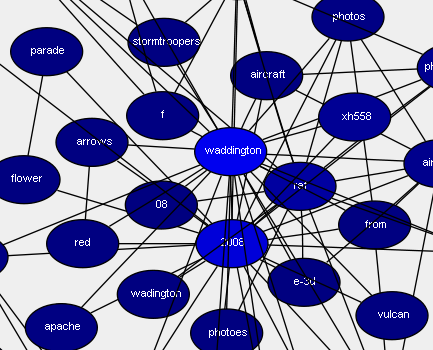
I've been running my ruby and graphviz weblog tool on an ad-hoc basis for a while now, generating my photography search hits page, and it's been running pretty well. I've had to iron out one or two small issues but mostly it's run smooth and has been interesting.

I did an update earlier on today and found this:


It's pretty cool that people are finding my RAF Waddington photos, but it's even more cool to see XH558 turn up there.

2008-06-06

Some RedBubble Hacks

No website is perfect, that's probably even more true for the more "social" type sites where you tend to spend a lot of time working with them, and I've found that RedBubble is no exception.

A while back I took a look at Greasemonkey (something I'd been meaning to do for ages) as a method of fixing one little RedBubble niggle and, since then, I've "fixed" a few things that have bothered me.

Given that I've got a few RedBubble hacks kicking about now I thought it might be an idea to list them here:

RedBubble "Edit This" hack
This adds a much-needed "Edit this" link to a public view of a work. I often find that I'll notice a small problem with a work when I'm seeing it how everyone else sees it. Such a view doesn't have a way of taking you directly to the edit page for the work so this hack fixes that.

Better text formatting hints
RedBubble uses Textile as the markup language of the site and most people don't know it (I'd never seen it before I started using RedBubble). This little hack replaces the rather sparse help that is given on various edit pages with a more comprehensive cheat sheet.

Public view tab for mybubble
This little hack simply adds an extra tab to the mybubble pages that takes you to your public view. While such a link does exist in the mybubble pages this makes it more obvious.

Watch a forum thread in Google Reader
RedBubble's forums provide RSS feeds so you can keep track of what's going on. This hack adds a "Add to Google Reader" button to each thread so you can quickly and easily add them to Google Reader.

Watch comments for a work in Google Reader
Similar to the above but for the comments made on any work on RedBubble.

Move user actions further up a user's profile
Each user profile page on RedBubble has a couple of user actions: one to add/remove them from your watchlist and one to send them a BubbleMail. The problem is that, at the moment, these actions come below the written profile for the user. Lots of users have very long profiles, often with large image previews in them. Because of this you've got to scroll down quite a way to find those actions. This hack fixes that by moving the actions to before the user-written profile.

Simple BubbleMail preview
Another Textile thing. RedBubble's BubbleMail system (the internal messaging system for the site) has no preview facility. It's also pretty easy to mess up when working with Textile formatting. This hack provides a simple preview system that helps catch any silly errors before you hit the send button.

Extra paging for mybubble work lists
The lists of works in mybubble (your private view of your works) only have the page navigation links at the bottom of the lists. This means that you've generally got to scroll down the page to get to the next page. This hack fixes that problem by placing a clone of those links at the top of the list.

Average views per public work
Possibly the least useful of all the hacks. This one adds an extra bit of information to the view count stats you get in the work lists in mybubble: the average number of views per work.
Hopefully, as RedBubble develops, most of these hacks will become less useful. The ideal situation would be that such things are built into the RedBubble site itself. Until such a time...

2008-05-29

Rails, Simile Timeline and Pocket IE

Following on from earlier, I ran into another problem with my little test application but, thankfully, it ended up being easy to fix.

In the application I make use of Timeline. Including it in the application is simple enough. I just include this:

javascript_include_tag(
"http://simile.mit.edu/timeline/api/timeline-api.js" )
in the html.erb file and the Timeline is available for use (I'll probably go with a local version at some point soon, I've just not got around to sorting that out yet).

The problem I ran into is that Pocket IE on my Pocket PC (a Dell Axim X50) doesn't seem to like this and throws an "Object Error". This was easy enough to solve in the end. I simply added this:
# Test if the request came from Pocket IE.
def pocket_ie?( request )
request.env[ "HTTP_USER_AGENT" ][ /MSIE.*Windows CE/ ]
end
to my ApplicationHelper class and then, in the html.erb file, simply said:
unless pocket_ie?( request )
javascript_include_tag(
"http://simile.mit.edu/timeline/api/timeline-api.js" )
end
Combined with a handheld specific stylesheet to hide the div that contains the timeline I end up with a version of the page that works in Pocket IE with no problems.

Okay, I guess it's a little kludgy, but it works and solves the problem at hand.

Ruby on Rails (and some WAP)

I'm quite a fan of ruby and have been for many years. In the last year or so I've been meaning to get to grips with rails but, every time I've tried, we've ended up having a falling out.

Most of the reasons have tended to be based around the (it seems to me) amazing lack of useful documentation. Sure, there's lots of stuff out there that documents the framework, but the sort of documentation that helps ease you into the learning process seems very thin on the ground.

Not too long back, at the suggestion of Rich Daley, I invested in a copy of Agile Web Development With Rails. This was just the sort of thing I was looking for and it's been a huge help (and also a huge source of frustration in itself seeing as how it's aimed at an earlier version of rails than the one I've got installed, but I've managed to get over that hump — it also seems that there's a third edition on the way).

Even with that book I still had a couple of aborted attempts to get to know rails better. As often happens with me the problem really came down to not having a goal to work to, a problem to solve, an application to build. Finally, last week, I devised a problem to solve and set to work.

And it worked, and it's been enjoyable. So far I'm impressed.

For me a good development system is one where my needs have been anticipated and, up until now, rails seems to deliver. A good example happened very recently. After having "finished" my little test application I thought it might be fun to add some simple WAP support. I imagined it would be easy enough using respond_to. Something like this:

def index
respond_to do |format|
format.html
format.wml
end
end
However, that didn't work. rails didn't know what to do with a "wml". A quick Google search later (see, the online docs are fine once you know what you're doing) and I found that all I needed to do was to edit my config/environment.rb to add the following:
Mime::Type.register "text/vnd.wap.wml", :wml
A restart of the server later and everything was fine. All I then needed to do was to create a index.wml.builder along the lines of this:
xml.instruct! :xml, :version => "1.0"

xml.wml "xml:lang" => "en-gb" do

xml.card :title => "My title here" do

xml.p "Something interesting here"
xml.p "Something else interesting here."

end

end
and I was done (and testing was easy enough thanks to the wmlbrowser add-on for Firefox).

I think I'm going to like rails. Now to find a real problem that needs solving...

2008-05-16

RedBubble Art Manager for Windows v1.4.0.0 Released

Earlier today I released a new version of my RedBubble art manager application (that was v1.3.0.0).

The main change in that release was the addition of a "Preview" button to the promotion code dialog:


When you use this a new window will appear that shows a preview of the image that is generated, like this:


Also, as per a suggestion from shawhouse, I added size parameters to the laminated and framed prints. This makes a subtle difference to the final image.

Just as I was making the release I got a message from reflexio to say that they'd discovered that RBArtMan failed to download an art list if you've only got a single page of art. This was a very easy fix.

So, later on in the day I released v1.4.0.0.

As well as fixing that bug I added a profile promotion code generator dialog:


It generates code that creates a banner for your profile just like you can find in your promote tab here on RedBubble. The main difference is that it'll do Textile code (used as the markup language on RedBubble) and BBCode as well as HTML.

The result is that you get little banners like this:

2008-05-15

RedBubble Art Manager for Windows v1.2.0.0 Released

I've just uploaded a new version of my RedBubble art manager application (this is v1.2.0.0). You can get it from here.

The main change in this release is to enhance the "promote a work" dialog as per Julie Langford's suggestion. Whereas before it simply let you promote with a simple image it now lets you promote with a simple image or one of the various product previews:


The result of something like that being:


Another change is that I've added a command that takes you directly to a work's edit page on RedBubble, something I thought of after reading a comment made by Shelley Heath.

2008-05-14

RedBubble Art Manager v1.1.0.0 Released

I've released a quick update to my RedBubble Art Manager application, it can be downloaded from over here.

The main change in this release is to implement an idea suggested by Julie Langford. There's now a command that lets you generate simple "promotion codes" for individual works which can be used elsewhere:


You simply pick the style of code you want (Textile for use on RedBubble itself, BBCode for use on sites that use BBCode and some simple HTML that might be useful in blogs and the like) and the style and size of image you want and then copy the result to your clipboard.

2008-05-13

RedBubble Art Manager

Ever since I wrote a ruby script for exporting a list of your art on RedBubble I've been toying with the idea of writing a variation on that theme that might be useful to people who aren't in the habit of getting "down and dirty" on their Windows machines, people who prefer not to install software they don't know about and who don't fancy running command line scripts.

Last week I finally cracked and started work on something:


You can read some more about it over here.

2008-04-30

extlogkeywords

On the off chance that it might be useful to someone I've put a copy of extlogkeywords on my website. This is the tool I wrote to generate the data to feed GraphViz and which is central to the production of my clickable search term interconnectedness graph thingy.

It's not terribly good ruby code, it could do with some tidying up. Also, because I hacked up a quick-and-dirty apache log parser, it probably won't even work for your logs (I should probably hunt down a good and flexible ruby library for that, there's got to be one out there). Still, if anyone wants a play/hack, it's there for the taking.

2008-04-29

More ruby, graphviz and weblogs

Things have progressed a little further with my initial play with GraphViz. I noticed that it can produce SVG output and that the input format permits links to be associated with nodes. This meant it would be easy enough to produce a graph, with links, that could relate back to searches made on my site.

I decided to keep things simple and just deal with my photography so, after a little bit of extra scripting later, my site has a clickable search term interconnectedness graph thingy.

No sofas, slimy things with legs, horses, monks (electric or otherwise) or stoned poets were harmed during the writing of this code.

ruby, graphviz and weblogs

For the past few days I've been following Tim's messing about with some Haskell weblog analysis code and I've been meaning to have a play myself.
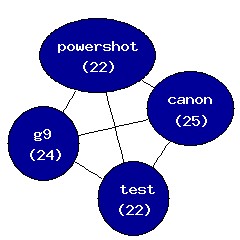
Some time ago I knocked up a little ruby script to extract the search terms from my weblogs. It never did anything clever and probably didn't do anything as near as clever as some of the things I could download but, well, you know what it's like when you want to hack up something yourself.

So, last night, I got around to extending it so that it would emit different types of reports. One that I added was a type of graph output (similar to Tim's) and, once I had that, I kept thinking that doing something graphical with the data would be the next fun option.

A quick search on the net and I stumbled on GraphViz. I then had a quick read up on the DOT language and I then extended my utility so that it would emit the graph data in DOT format. It took a little bit of messing about but, finally, I had something that worked.

The result looks like this. That's a subset of my web logs (if I throw too much at GraphViz's neato command I run out of memory!) and it only shows individual words that have appeared more than once. The numbers in brackets are the count of the number of times the word appears in the data. The lines, obviously, show how the words are related to each other as found in search query strings.

There's no surprise that the graph seems to cluster around Clipper and mutt.

I'm not sure that any of this tells me anything useful, but it is a different way of looking at what searches result in hits on my site.

2008-04-03

RedBubble works on a Google Map

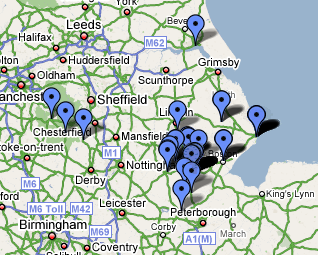
Yet another simple application of the photography querying code I recently wrote:


The querying tool that I wrote knows which items on my main site are also on RedBubble. This means that it's one simple query to emit a KML file that would show all of those works on a Google Map. The code looks something like this:
#!/usr/bin/env ruby

require 'photography'
include Photography

...KML header/document start emitted here...

# For each photograph that is on RedBubble...
Albums.new.load.images.select {|i| i.for_sale? }.each {|i|
...KML Placemark emitted here...
}

...end of KML document emitted here...
Nice and simple.

The resulting file can then be fed to Google Maps, Google Earth or Virtual Earth. It can also be used to create an embedded map.

2008-04-02

ruby, geonames and photography

Recently I've been working on some ruby code that serves up the photography content of my website as a ruby object (no, it's not available for download anywhere, it wouldn't be any use to anyone else). The point behind it is that it lets me query my photographs in all sorts of different ways (especially handy when working in irb as it means I've got a kind of REPL for working with my photographs) and also makes it easy to write programs that generate useful data.

Last night I got to thinking that it would be interesting to use this code to try and "reverse geocode" the ICBM address that every album has so that I could display the nearest centre of population to the album.

After a bit of searching on the net I found GeoNames. A handy enough site itself but even more handy because it has an API and a list of client libraries that are available. Handily there's a library for ruby.

A little bit of hacking later and I had this:

#!/usr/bin/env ruby

require 'geonames'
require 'photography'

include Photography
include Geonames

# Get place names for all the icbm locations
Albums.new.load.collect {|album|
[ album.latitude, album.longitude ]
}.uniq.each {|icbm|
near = WebService.find_nearby_place_name( icbm[ 0 ], icbm[ 1 ] )
puts( "#{icbm[ 0 ]}\t" +
"#{icbm[ 1 ]}\t" +
"#{near[ 0 ].name}\t" +
"#{near[ 0 ].country_name}\t" +
"#{near[ 0 ].distance}" )
}
Put simply: it gets a list of the unique locations that I've recorded and runs through them getting the nearest known location. I then use the resulting data on my site to display the name of the nearest location to where the album is from.

It isn't perfect. For example, most of the photographs I've shot in and around Billingborough end up being shown as being near Horbling (the next village north of here, and somewhat smaller than Billingborough). Still, it's a start.

Currently I've got the text linking to a search on nearby.org.uk. Via that there's some fascinating (for varying values of fascinating) links to further searches that can be done based on location.

2008-03-19

Lincolnshire Links

It's almost six months since I started using RedBubble and, in that time, I've slowly been sorting out my other photography pages so that they link into it.

Initially I had my main site linking in (including links from individual images like this) and then, just recently, I created a front end called Photography by Dave Pearson.

The one site that was missing out on this was Lincolnshire Photography. While I did have a set of links to my prints of Lincolnshire this was nothing more than a pointer to a specific tag on my RedBubble account. What I was missing was links from the individually available works.

Now I've done this. The site will display a list of prints of Lincolnshire and each individual work that is available also has a direct link to the RedBubble page for that work (like this for example).