Showing posts with label review. Show all posts

2011-11-10

Cambridge Sciences G7: One week in

It's now almost a week since I took delivery of my (finally working) Cambridge Sciences G7-II 7inch Android tablet so I thought I'd jot down some notes on how I've found it so far.

Overall, ignoring the "screen goes mental when plugged into the mains" problem, I'm happy with the device. I've been using it at those times when I've wanted something bigger and easier to handle that my HTC Desire HD but, at the same time, haven't wanted to pull out the Chromebook. It feels right in the hand (albeit somewhat heavy -- I can't imagine me ever using this instead of the Kindle as a ebook, for example) and, despite the fact that there's no feedback like I get on my phone, the screen is fine for typing on.
Overall, for the money, I'm happy with the purchase.
That said, here's a few niggles and observations:
  • The battery status seems to be way off. Even after a full charge it tends to only show 93% full. It then seems to fall very quickly then ease up a little. I often also find that when I turn it off and turn it on again the battery will come back as showing having a higher charge than when I turned it off. This then falls rapidly back to where it was when I turned it off. All that said, the battery status seems roughly right so I've yet to find myself caught out by a low battery I didn't expect.
  • Out of the box the auto-complete that's part of the keyboard doesn't appear to have a British English dictionary. Because of this the only auto-complete options you get when you're typing are things it can complete from the device's local data (application names, contact names, etc...). This is a bit of a serious issue but not one without a solution. Although it's essentially the same keyboard I installed Gingerbread Keyboard+ (which does have a British English dictionary) and have made that my keyboard instead. This is the keyboard I use on my phone anyway so not only does it solve the problem, it makes me feel more at home.
  • There seems to be a pre-installed copy of EF File Explorer that can't be updated from the Android market. Any time I try and update it I get an error saying it's incorrectly signed. Bit of a shame because I use EF File Explorer.
  • While I do appear to have and be connected to the UK Android Market with the tablet some apps seem to be missing. For example, the UK Amazon app (the one that lets you shop from Android) isn't anywhere to be seen. Same goes for the Box.net app.
  • While I haven't had any of the WiFi problems some have reported in the reviews on Amazon (I imagine those problems have more to do with their WiFi setup than a problem with the tablet) I have found that it can be a little temperamental at times. Now and again I've had to stop and start WiFi to coax it fully into life. I also note that, if the unit has fully turned off and I've then turned it on again, I have to manually start WiFi. Not a big deal.
  • From time to time it seems to fully power off after some time in sleep mode. I've not worked out if there's a reason for this, or if it can be changed. Neither does there seem to be a set time between being put into sleep mode and it turning itself fully off. This, again, makes for a mild annoyance because, most of the time, it means you can't just pick it up and do stuff -- there's a boot time you have to wait around for. While it's not terribly long (I've not timed it but I'd say around 60 seconds) it does mean it can take longer to get the tablet up and running than it can to get the Chromebook going.
And, so far, that's pretty much it. No show-stopper. Nothing that makes me hate it and want to send it back. It's not perfect, but then again it's around 1/2 the price of tablets that try to be.

2009-10-20

Vodafone push Android Donut to my HTC Magic

I first saw it was heading my way last week and, sure enough, last night, Vodafone pushed Android Donut onto my HTC Magic.

I knew pretty much what to expect in terms of headline features, thanks to this video:


but there's a couple of other things that have changed that I really like.

First off, it seems that screen orientation changes are now much faster. Before, when I changed the orientation of the phone from portrait to landscape (or back) it would take a couple of seconds to sort itself now, now it seems to be a fraction of a second — almost to the point of feeling like an instant change.

Another change, again a speed thing, is that the camera feels much more responsive, and quicker to start up too (although I think the startup time as something to do with the above change). This is a good thing from my point of view given that I use the phone as the camera that populates my photoblog.

The new search facility is really nice in that, now, I don't need to bother with the search gadget on the home screen any more. Until now I had it on the middle part of the home screen taking up a fair amount of space (see right) but, with 1.6, the search tool comes up when you press the hardware search button so there's no need to use the gadget any more. That means I get four "cells" back on home. That's come in very handy.

So far I've only run into one problem after the 1.6 install. It seems that Google Search by Voice is now broken. Any time I try and run it I get a "force close" dialog (I know I'm not the only one too because there are plenty of comments in the Android Market reporting the same problem). That's kind of a shame because the new search facility searches contacts, amongst other things, so it would seem like the two together will work as a voice dial (in fact the video above suggests this too). Doubtless a new version of Search by Voice will turn up in the Android Market real soon.

2009-02-01

Lensbaby Muse Case

Lensbaby Muse on EOS 400DI've been getting on pretty well with my Lensbaby Muse, so well that I've actually made a point of taking it off the 400D for now to stop me shooting everything with it (really, I'm not kidding).

Lensbaby Muse Case #1Having done this, I got to thinking: generally, when I go out to shoot, I tend to pick a lens and stick with it for the day. On the whole this works well and the fact that I do this is reflected in the fact that I don't actually have any lens cases for any of my lenses. The Lensbaby sort of throws this idea out though. It's the sort of lens that doesn't work for every shot but it's also the sort of lens you want to hand for those shots you see that cry out for the Lensbaby treatment.

Lensbaby Muse Case #2So I decided to get a case for it. Turns out the Muse has a case available for it and so I ordered one last week and it turned up last Saturday. I'm very impressed with it too. I was expecting something "squishy" but it's actually very rigid. It feels like you could drive over it and it would survive (I'm not suggesting you could, I'm just saying it feels like it — if you want to try that then all the usual disclaimers apply ;-)). Even better, it's not much bigger than the lens itself and, because of this, it means the whole thing easily fits into a (large) coat pocket — very handy!

And, as a bonus, it's a perfect snug fit for the Canon EF 50mm f/1.8 II.

2007-11-15

PowerShot G9: First impressions

As I mentioned late last week, I've acquired a Canon PowerShot G9.

Ever since I got my Canon EOS 400D, and started getting addicted to photography, I've been wanting a compact camera that I could take anywhere (sometimes a dSLR is just too bulky). I also wanted one that had a good range of control (full manual mode right through to an auto-everything "I don't want to have to think" mode), felt solid and, as daft as it sounds, looked good. The G9 seems to fit all of these (the fact that it does raw files too is a bonus).

I won't even bother trying to do anything close to a review, there are plenty of those about, some of them going into great detail. I did, however, want to note my first impressions of it.

I went for a walk around our village last Sunday and took only the G9. The results can be seen over here. I found that the camera handled pretty well. The screen was easy to use in all conditions (shade and direct sunlight), the camera itself felt right in my hands, the buttons and dials are a bit on the small side for my fingers but not impossible to use (and it probably wouldn't be that good a compact camera if it wasn't very compact, right?), program-auto mode seems to cope fairly well with most situations and manual mode is a joy to use (I don't think I'd ever really thought about just how useful a live histogram would be).

Being small it's also very easy to keep to hand and the time from pressing the power button to being in a position to take a shot (assuming I've left it in program-auto) is short enough that it wouldn't be an issue in most cases.

Simply put: so far I'm very happy with it. I feel that it pretty much perfectly fits the requirement I had. It'll be nice to be able to take a camera almost everywhere with me now.

2007-03-20

Moo!

Not too long back I decided to create a Flickr account, partly out of curiosity and also partly out of a desire to have somewhere to dump pictures that I didn't want to place in the photography section of my site.

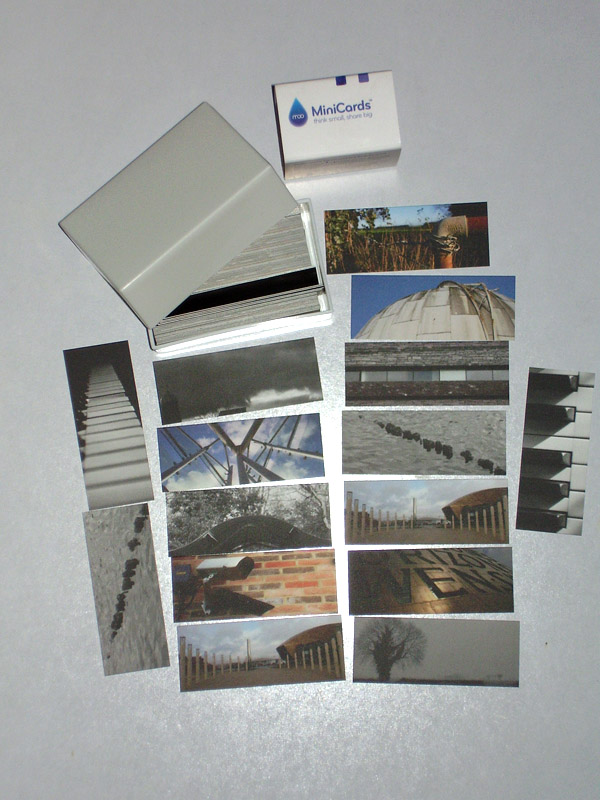
Then, just over a week ago, I noticed an advert for Moo. Given that a pack of 100 cards would cost next to nothing I thought I'd give it a go. If nothing else it seemed to make sense to have some cards with contact details in the camera bag on the off chance that you needed to supply someone with those details.

The cards turned up today (just over a week after placing the order — Moo aren't terribly fast) and I'm pretty pleased with them. They're small, clean, simple and come in a handy little plastic box. I'd have said that the images have turned out a little on the dark side but not so much that they're unattractive.

My only real complaint is that Moo is one of those companies/services that tries really hard to be "cute". They interact with you like they're your best mate (the package even included a little delivery card that says "Yay! You're our new best friend" – Ugh!). Like they're amazingly cool. Like using them is the best fun you can have. They're not. They aren't. It isn't. But the product itself is cheap, cheerful, self-designed and pretty handy.